Filter as you type, press Enter to open the first result6 results
Risk warning:CFDs and leveraged forex trading are high-risk products that can lose your entire capital very quickly, and are not suitable for every investor. Everything on this site is information only and is not investment advice, an offer or a recommendation. Check the rules that apply where you live and read the broker's full terms and risk disclosure before opening an account. Some links on this site are affiliate links that may earn us a commission; this does not affect our scores or rankings.
XM Swap Long and Swap Short: How to find rates and estimate charges
Find buy and sell swap rates in desktop MetaTrader, estimate their monetary effect under stated assumptions, and investigate differences from a booked account entry.
The supplied examples are labelled 26 to 27 October 2026; their capture dates, contracting entity and country eligibility are unverified. They establish neither availability in Thailand nor worldwide availability. Results depend on account type, exact symbol and suffix, contract size, currencies, device, platform version and current terms. Instructions cover documented desktop MetaTrader routes; mobile MetaTrader and XM app navigation remain unverified. No executed trade, personal test or support resolution was supplied.
Before you start
For a position-specific estimate, identify the account currency, exact symbol and suffix, direction, volume, swap mode, point definition, contract units per lot, relevant currencies and applicable multiplier. Comparing an estimate with a booked entry also requires the relevant rollover records.
What you will learn
Use the applicable specification inputs to make a conditional monetary estimate and compare it with a specific account-history swap entry. Explaining a discrepancy requires the historical rates, rollover details, conversion and rounding treatment.
Overnight financing can debit or credit a trading account. XM Global describes swaps this way for derivative positions held overnight and directs clients to the Members Area for rates and calculations. Its disclosure does not establish which entity serves your account or which rollover schedule applies. XM Global risk disclosure, section 6.3
To check a swap charge, find the exact symbol's Swap Long and Swap Short fields. Use its calculation mode to estimate the monetary amount, then compare the estimate with the account entry.
Use your own account type, exact symbol and suffix, contract size and currencies for any estimate. The steps below use desktop MetaTrader. The calculator screenshots illustrate how to read the fields.
Understand the rate before treating it as money
Swap Long applies to buy positions; Swap Short applies to sell positions. Read each field separately. Do not calculate one by reversing the other's sign. MetaTrader 5 symbol specifications
The displayed rate, monetary estimate and booked swap measure different things:
The displayed rate is the value in the exact symbol's specification, interpreted using its swap calculation mode.
A monetary estimate calculates the effect for a particular direction, volume, multiplier and account currency.
The booked swap is the entry recorded for the position in the account records.
MetaTrader documents points, currency and percentage calculation modes. A raw value such as -7.48 does not automatically mean USD -7.48. Identify the configured mode and unit first. MT4 calculation modes · MT5 calculation modes
For a signed monetary result, a negative amount indicates a debit and a positive amount a credit. A position can still lose money despite receiving a swap credit. XM Global's disclosure warns that substantial trading losses can occur. XM Global risk disclosure
Find the exact symbol's specifications
Start with the account and exact symbol you want to examine, including any suffix. A similar instrument name on another account is insufficient for estimating your position's swap.
On desktop MT4, open Market Watch, open the symbol's context menu and choose Specification. MT4 documentation also describes a Properties route. MT4 Market Watch · MT4 contract specification
On desktop MT5, open the symbol's context menu in Market Watch and choose Specification. MT5 Market Watch
Record Swap Long, Swap Short, swap type, contract size, price precision, the defined point size and relevant currencies. MT4 documents a triple-swap day; MT5 documents weekday swap multipliers. Read the values configured for your symbol. MT4 specification fields · MT5 specification fields
Menu wording may vary with operating system, installed build and interface language. Those details were not supplied. These desktop paths are not verified for mobile.
A position estimate also requires its direction, volume in lots and applicable rollover multiplier. You do not need to disclose personal details to understand the method. Comparing the estimate with a booked charge requires the relevant rollover and account records as well.
Check whether a symbol qualifies for Ultra Low swap-free terms
Figure 1. An XM Help Center screenshot showing where to look up an instrument’s swap information. XM’s trading FAQ limits Ultra Low swap-free trading to certain instruments. Check the terms and specifications for your account.
Use the calculator and distinguish rates from monetary outputs
In XM’s All-in-One Calculator, select the account currency, account type and exact symbol. Enter the trade volume and calculate. Compare the rate fields for the instrument with Swap Long (USD) and Swap Short (USD) when the selected account currency is USD.
The following numbers are from the calculator images. To estimate a current position, use the inputs and current rates for your own account.
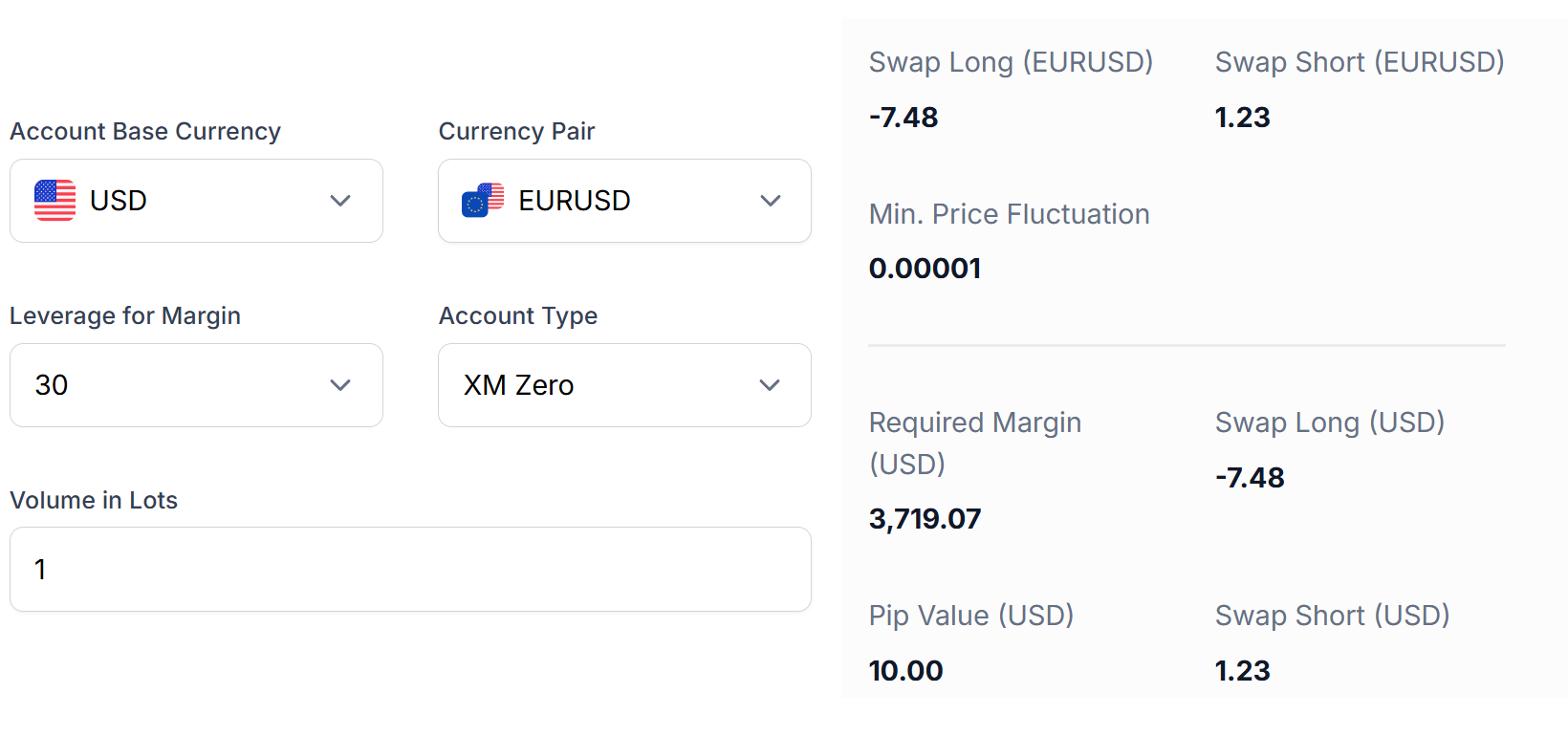
EURUSD on an XM Zero account
The source labels this screenshot 27 October 2026. The calculator shows a USD account and 1 lot.
Account and symbol
Raw Long rate
Raw Short rate
USD Long output
USD Short output
XM Zero: EURUSD
-7.48
+1.23
-7.48
+1.23
Figure 2. The XM Zero EURUSD example shows a long output of −7.48 USD and a short output of +1.23 USD. The raw rates happen to have the same numerical values. Check the swap mode to determine the rate’s unit.
GOLD: compare contract exposure as well as lots
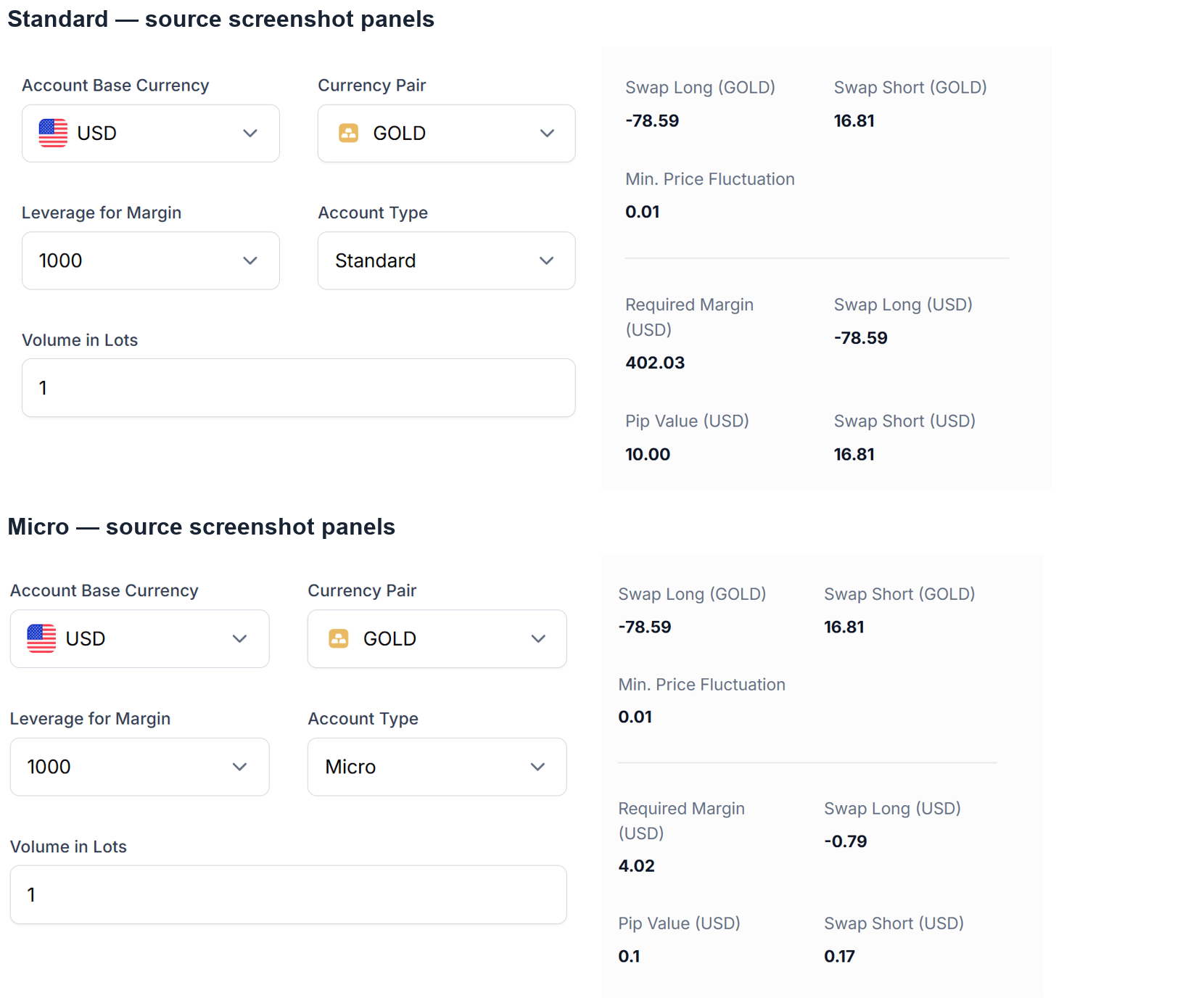
The source labels the GOLD comparison 26 October 2026. Both panels show a USD account and 1 lot.
Account and symbol
Raw Long rate
Raw Short rate
USD Long output
USD Short output
Standard: GOLD
-78.59
+16.81
-78.59
+16.81
Micro: GOLD
-78.59
+16.81
-0.79
+0.17
Before comparing two account types, check the contract units per lot. The displayed lot amounts are the same, and the screenshots show different pip values and USD swap estimates.
Figure 3. Standard and Micro GOLD panels show the same raw rates. For 1 lot, the calculator shows −78.59/+16.81 USD for Standard and −0.79/+0.17 USD for Micro.
Calculate a conditional points-based estimate
For a linear contract explicitly using price points, an illustrative calculation is:
Estimated swap in quote currency = signed swap points × defined price-point size × contract units per lot × lots × applicable day multiplier.
If conversion is needed:
Estimated swap in account currency = quote-currency amount × account-currency units per one quote-currency unit.
State the conversion factor in that direction. Currency and percentage swap modes require their own definitions; do not apply the points formula to them. MetaTrader documents the available modes and defines contract size as the number of asset units in one lot. MT5 symbol specifications
Every calculation below is hypothetical. The assumed inputs illustrate the arithmetic without establishing XM's actual contract specifications, conversion procedure or rounding policy. Rounded examples use half-up rounding to two decimal places after calculating the unrounded amount.
EURUSD: direction, volume, multiplier and conversion
Assume:
Contract size: 100,000 EUR per lot.
Price point: 0.00001 USD per EUR.
Account currency: USD.
Volume: 0.10 lot.
Day multiplier: 1.
Swap rates treated as points: -7.48 Long and +1.23 Short.
For this example, define one pip as 0.0001; a 0.00001 price point therefore equals 0.1 pip.
With an applicable multiplier of 3, the buy amount becomes USD -2.244, approximately USD -2.24. Apply the multiplier to the unrounded amount.
For an illustrative EUR account, a hypothetical conversion factor of 0.90909091 EUR per USD gives:
USD -0.748 × 0.90909091 EUR per USD ≈ EUR -0.68.
This factor is an assumption. It is not a recorded conversion quote from the supplied image.
USDJPY: calculate JPY before converting
Assume 100,000 USD per lot, a 0.001 JPY-per-USD point, 1 lot and multiplier 1.
+2.11 points produces +211 JPY.
-29.59 points produces -2,959 JPY.
Multiply each amount by the hypothetical conversion factor of 0.00633714 USD per JPY to estimate USD +1.34 and USD −18.75.
SILVER and GOLD: contract units change the result
For SILVER, assume 5,000 ounces per lot, a 0.001 USD-per-ounce point, 1 lot and multiplier 1. Each point is then worth USD 5 for that volume. Rates of -17.52/+3.93 points produce USD -87.60/+19.65.
For GOLD, assume a 0.01 USD-per-ounce point, 1 lot, multiplier 1, and contract sizes of 100 ounces for Standard and 1 ounce for Micro. A -78.59-point rate produces USD -78.59 and USD -0.7859 respectively; the latter rounds to USD -0.79.
These assumptions explain selected supplied outputs mathematically. They do not authenticate the screenshots or establish actual XM specifications.
Changing leverage alone does not change contract units in this fixed-volume formula. The manuscript describes the calculator's selector only as "Leverage for Margin"; that label does not supply a swap-calculation input.
Confirm the applicable rollover and multiplier
XM’s rollover FAQ uses Wednesday’s threefold rollover to explain weekend financing. To find the multiplier for your trade, use the schedule for your exact symbol and confirm the cutoff with XM if needed.
Check the exact symbol's triple-swap day in MT4 or weekday multipliers in MT5. These are documented platform fields; read the values for the relevant symbol. A generic platform example does not establish XM's schedule. MT4 triple-swap field · MT5 weekday multipliers
Obtain account-specific confirmation of:
The applicable rollover cutoff and its relationship to server time.
Any daylight-saving treatment.
The multiplier applying to that rollover.
Any holiday adjustments.
No account-specific cutoff, local-time conversion or product-wide schedule is established here. If a position crosses its applicable cutoff, financing can matter even during a short holding period. A multiplier of three represents the financing calculation; it does not prove that the position was held for three days.
For multiple rollovers, calculate using each applicable rate and multiplier. Do not extrapolate a dated example across the whole holding period. XM Global states that instrument information, including swaps, can change. XM Global risk disclosure, sections 6.1 to 6.2
Interpret zero swaps and opposite positions carefully
XM’s trading FAQ describes a swap-free selection for Ultra Low. Check the exact symbol for eligibility. When the swap is zero, other trading costs and price risk still apply.
For opposite positions, assess each leg separately using its direction, volume, rate and multiplier. Do not assume that financing cancels or that hedging is available for your account.
Investigate a difference between your estimate and booked swap
Compare the estimate with the specific account entry:
Match the account, exact symbol and suffix, buy or sell direction, and volume.
Check the swap mode, point definition, contract units per lot and relevant currencies.
Establish the historical rate applicable at the rollover, cutoff, server timestamps and daily multiplier, including any confirmed holiday adjustment.
Check the account-currency conversion factor and rounding treatment.
Keep the relevant symbol-specification capture, trade ticket, server timestamps and account-history swap entry.
These checks follow the inputs documented in MetaTrader's symbol specifications. A current rate or calculator output alone cannot explain a historical booked charge.
If the difference remains, ask XM to explain that specific entry and provide the calculation in monetary terms. XM Global's disclosure advises obtaining a clear written explanation, with appropriate examples, when charges are not expressed in money terms. XM Global risk disclosure, section 6.1
Auditor
Diego GarcíaSenior Reviewer
Applies treasury and financial risk experience to broker costs, account conditions and trading tools.



 XM