


 Exness



On this page
- Applies to
- Processing estimates and availability depend on the account, registered region, verification status, payment route and receiving institution. Supplied screenshots illustrate displayed estimates and an account-specific availability restriction; they do not document a submitted withdrawal, bank credit or measured settlement time. The manuscript is dated 27 October 2026; this submission does not declare independent current verification. No country, legal entity, account type, currency, device or application version is identified. Official snapshots supplied for this guide were retrieved on 3 November 2026.
- Before you start
- Before submitting a withdrawal, confirm sufficient available funds, an available withdrawal method and completion of required account or payment-method verification. To investigate an existing withdrawal, open its entry in Personal Area Transaction history.
- What you will learn
- Identify the relevant withdrawal estimate, distinguish eligibility restrictions from transaction status, and prepare a traceable support request without assuming a resolution time.
Exness withdrawal times vary by payment method. Your Personal Area shows the average and maximum expected processing times. The average is an estimate, not a guaranteed completion time. If the applicable maximum has passed and the money has not arrived, request support from Transaction history. Exness's missing-withdrawal guide explains when to contact support.
The official material supplied for this guide does not define "Instant." Do not treat that label as a promise of immediate credit to your bank account or wallet. Check your method's current conditions and ask support what the estimate covers if the wording is unclear.
Understand what the estimate covers
To investigate a withdrawal, consider Exness processing, payment-route handling and credit to the receiving account. These stages provide a way to frame questions about a missing payment. They do not establish where a particular transaction is delayed.
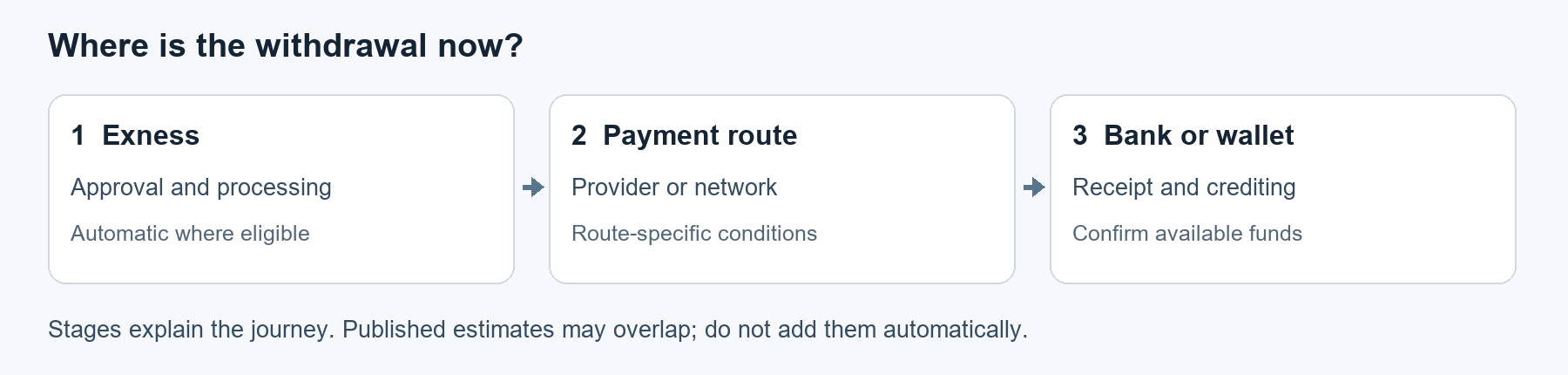
Figure 1. Three stages to consider when tracing a withdrawal. This conceptual illustration does not show measured durations or identify where a transaction is delayed.
Do not add these stages together as three separately measured durations. A displayed estimate may cover several stages. If the timing is unclear, ask which event starts the clock and which event counts as completion. Check the receiving account if you cannot confirm receipt.
Find the estimate for your account
In your Personal Area, open Payments & wallets, then Withdraw/Withdrawal. Labels may differ by interface and language; the supplied material does not identify a device or application version. Check that you are viewing withdrawals rather than deposits or transfers between trading accounts.
The withdrawal section displays projected processing times, applicable fees and minimum and maximum withdrawal limits. Exness describes processing ranges as average-to-maximum predictions. See the Personal Area guide and payment-method information.
| Field to check | How to use it |
|---|---|
| Processing range | Read both the average and maximum, including the stated time units. The average is not a deadline. |
| Applicable fee | Check the fee shown for the method; do not assume it is free. |
| Minimum and maximum limits | Confirm that your proposed amount falls within the displayed transaction limits. |
| Availability | Check whether your account can currently use the method. A displayed estimate does not establish eligibility. |
The withdrawal-menu illustrations below show where method information appears. Their capture dates are unspecified. The reference 00:01 is a position in the supplied recording, not a withdrawal duration or capture date. The visible figures are historical illustrations and have not been independently verified. Use your own account's current information.
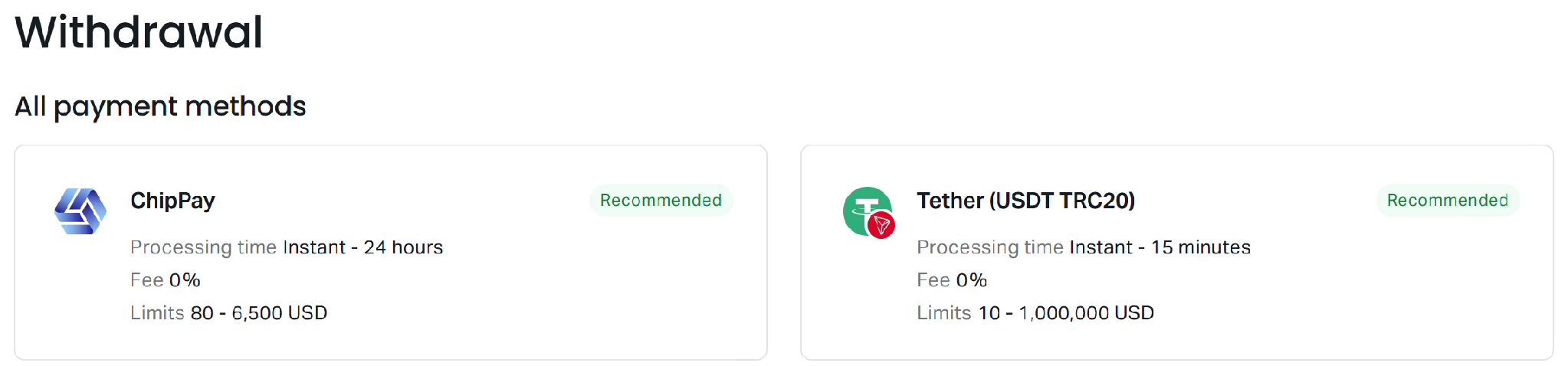
Figure 2. Historical menu illustration from the supplied recording at playback position 00:01; capture date unspecified. Displayed times, fees and limits are not independently verified current terms or measured payout results. Check your account’s current conditions.
Additional withdrawal-method cards appear in the next illustration.
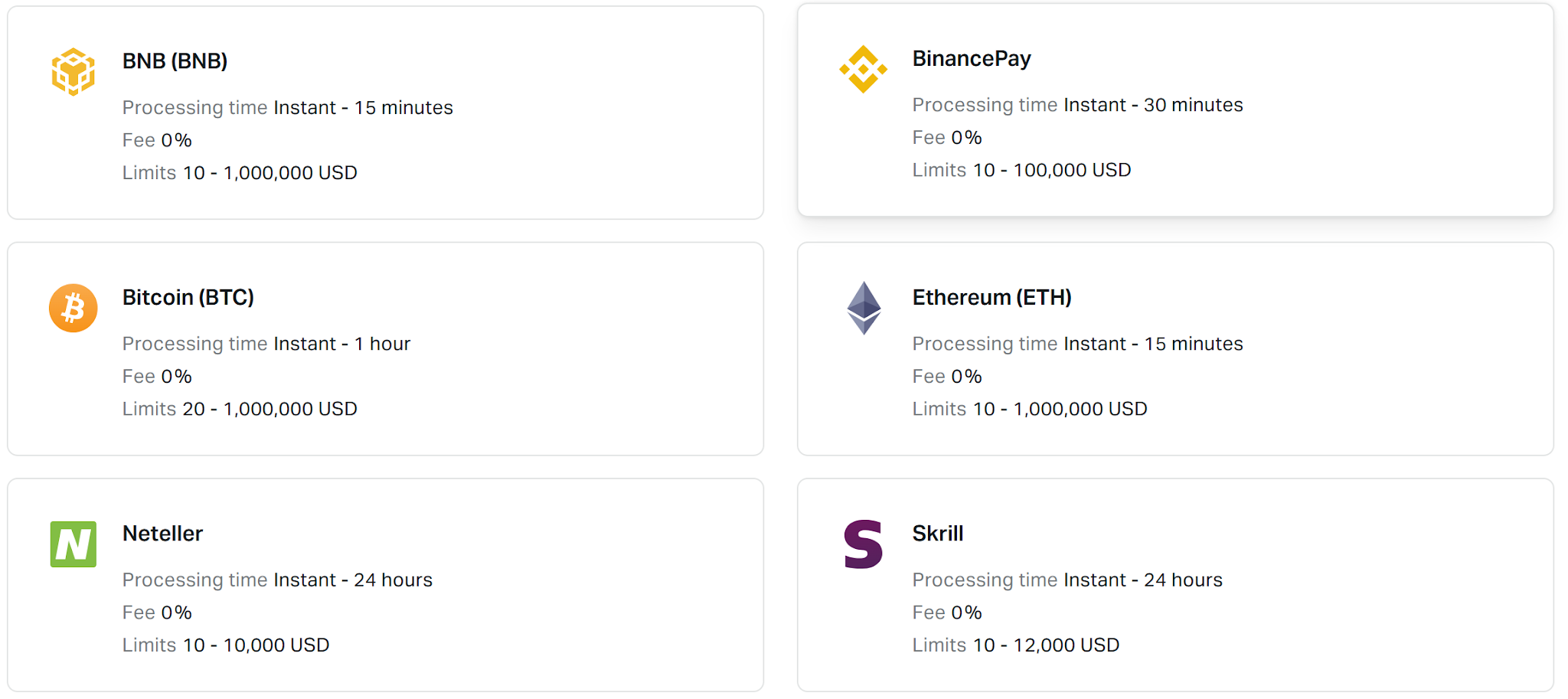
Figure 2A. Additional method cards in a historical screenshot with an unspecified capture date. Displayed figures are not independently verified and do not establish current terms, worldwide availability or measured payout performance.
The next illustration shows further network-specific withdrawal-method cards.
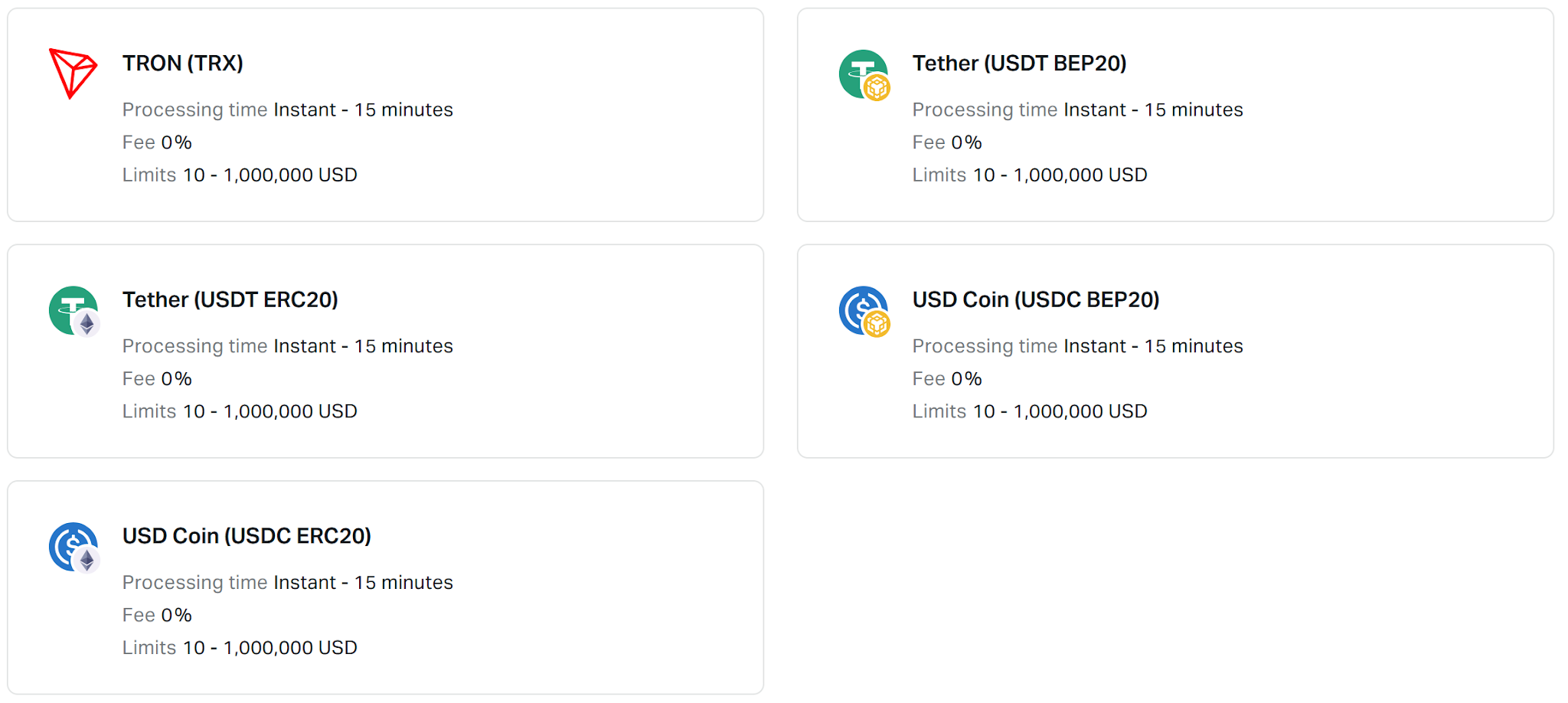
Figure 2B. Network-specific method cards in a historical screenshot with an unspecified capture date. Displayed figures are not independently verified; available networks and current conditions must be checked in your account.
These images do not establish current availability, worldwide terms or measured payout performance. Available methods depend on registered region and verification status, and Exness may change processing times or limit availability. Check the general withdrawal rules.
Check eligibility before submitting
Before withdrawing, confirm that your trading account has sufficient available funds, your preferred withdrawal method is available, and you have completed any required account or payment-method verification. Exness lists these prerequisites in its withdrawal instructions.
Check the receiving details carefully:
- The payment account must be registered to the exact full legal name registered on your Exness account. A mismatch causes withdrawal failure.
- Incorrect information, including account numbers, can cause delays.
- A withdrawal using an unverified bank card without prior deposits will be rejected. Card verification will be requested before withdrawal use.
These conditions come from the general withdrawal rules. If you are investigating a withdrawal already submitted, inspect that transaction. You do not need to submit another withdrawal to trace it.
How to count weekends
Check the units and counting rules for your method. Estimates in hours, calendar days and business days may use different counting rules.
Do not exclude weekends from an estimate expressed in hours unless the applicable terms say to do so. For a business-day estimate, establish which days qualify. If the start event, cutoff, time zone or relevant holiday calendar is unclear, ask support before calculating a deadline.
The supplied official material does not establish an Exness-specific weekend delay or Friday cutoff. It cannot support a universal claim that weekends always delay withdrawals or never affect them.
A hypothetical business-day example
Suppose a route explicitly quotes two business days. Assume the request misses a Friday cutoff, counting begins on Monday, and there are no relevant holidays. Monday is day one and Tuesday is day two.
This example shows how to count under those assumptions. It is not an Exness processing commitment or evidence that your method uses that cutoff or calendar.
Distinguish an unavailable method from a submitted withdrawal
A method marked Unavailable concerns whether you can use that route. The label alone does not describe the progress of a withdrawal already submitted.
The supplied manuscript describes the following image as an account check dated 27 October 2026. It contains a security-type notice and a withdrawal-method card marked Unavailable. The date and account-check description come from the manuscript; the image is not an independently verified current account check.
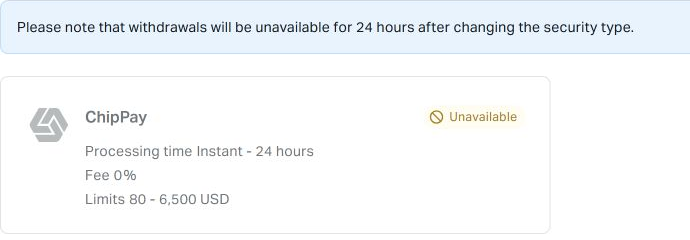
Figure 3. The manuscript dates this account view to 27 October 2026; the date and account-check description are not independently verified. The notice and Unavailable label do not establish the restriction’s cause, a platform-wide outage or the status of a submitted withdrawal.
The notice and label appearing together do not prove why the method is unavailable. They also do not explain every unavailable method or establish a platform-wide outage.
Exness's security-type guide describes several withdrawal restrictions:
- Changing the security type via face scan disables withdrawal actions from trading accounts in the Personal Area for 24 hours.
- The specified procedures for resetting the security type to email through face scan and video chat also describe 24-hour withdrawal restrictions.
- Some other security-type changes may trigger a restriction of up to 24 hours.
These restrictions affect withdrawal eligibility and are separate from the processing time of an already submitted payment. Follow the applicable procedure and your account notice. Do not infer the trigger or duration from an older image.
Trace a withdrawal that has not arrived
Start with one identifiable transaction:
- Open Transaction history in your Personal Area.
- Filter the history to withdrawals.
- Select the relevant withdrawal.
- Record its invoice ID, detailed timeline and exact status.
- Note the request time and your latest check time, including their time zones.
- Compare the transaction with the applicable maximum estimate, checking how its clock is counted.
Exness's missing-withdrawal instructions describe this navigation. Its Personal Area guide confirms that selecting a transaction opens a summary with the invoice ID and detailed timeline.
Read the exact status
| Status | Official meaning | Practical next step |
|---|---|---|
| Done | The transaction was completed. | Check the receiving account. If receipt remains unconfirmed after the applicable maximum, follow the missing-withdrawal support process. |
| Processing | The transaction is not yet complete. | Inspect the timeline and compare it with the applicable maximum. |
| Rejected | The transaction was canceled; the reason may vary. | Investigate the stated reason before deciding whether to try again. |
These definitions come from the Personal Area guide. Waiting longer does not resolve the reason for a rejected transaction. A Done status alone does not establish where a delay lies if you cannot confirm receipt.
When and how to contact support
If the applicable maximum processing time has passed without receipt, select the withdrawal in Transaction history and choose Get support. Exness gives this threshold in its missing-withdrawal guide. This guidance does not require a universal 24-hour wait for every method. For a rejection or an eligibility restriction, investigate the stated reason or applicable notice.
Prepare a concise summary with:
- Invoice ID, amount, currency and payment method.
- Request time and time zone.
- Exact status and relevant timeline entries.
- Latest check time and time zone.
- Displayed maximum estimate and its units.
- Relevant account notices.
- Whether you have checked the receiving account and can confirm receipt.
This checklist helps you prepare; it is not an official list of mandatory support fields. If necessary, ask support which event starts the estimate, what completion means for the route, and whether a route-specific payment confirmation or tracking reference is available. Such a reference may not exist for every method.
Keep passwords, verification codes and full payment credentials out of your summary, and use verified support channels. A traceable request helps support investigate the transaction. The supplied evidence does not establish a guaranteed resolution time.