Filter as you type, press Enter to open the first result6 results
Risk warning:CFDs and leveraged forex trading are high-risk products that can lose your entire capital very quickly, and are not suitable for every investor. Everything on this site is information only and is not investment advice, an offer or a recommendation. Check the rules that apply where you live and read the broker's full terms and risk disclosure before opening an account. Some links on this site are affiliate links that may earn us a commission; this does not affect our scores or rankings.
Exness withdrawal Done but not received: Payment trace guide | TOP10BROKERS
Exness withdrawal marked Done but not received: How to trace the payment
Find the exact withdrawal, check its maximum expected processing time, and ask for a payment reference your bank or wallet can investigate. Keep the records and confirm any eventual credit in the receiving account.
Payment methods, timing, support requirements and complaint procedures depend on country, contracting Exness entity, account and payment route. Country, entity, account type, account currency, device and interface version are unspecified for the supplied examples. They establish no availability in Thailand or worldwide. Official snapshots were retrieved on 11 November 2026; Figure 1 has a supplied capture date of 30 October 2026, while capture dates for Figures 2 through 4 are unspecified.
Before you start
Access to the relevant Exness withdrawal details and receiving-account records.
What you will learn
A documented payment investigation request, with separately labelled references and evidence of any eventual receiving-account credit. Recovery and a resolution deadline are not guaranteed.
If your Exness withdrawal shows Done but the money is missing from your bank or wallet, open the exact withdrawal and check the receiving account's activity. Exness defines Done as a completed transaction. The status alone does not establish that your receiving account has been credited. Save the invoice ID and transaction timeline, then check the maximum expected processing time for the method you used. Exness transaction-history guide.
If that maximum has passed and the withdrawal is still missing, Exness directs you to raise a support request from Transaction history. Ask for an investigation and a reference the receiving institution can investigate. Neither recovery nor a resolution date is guaranteed. Exness missing-withdrawal guidance.
Payment methods, timing, support requirements and complaint procedures depend on your country, contracting Exness entity, account and payment route. The country, entity, account type, account currency, device and interface version for the supplied examples are unspecified. The examples do not establish payment-method availability in Thailand or worldwide.
Video reference
What Done means when your account has not been credited
Transaction history includes withdrawals, transfers, refunds and other transaction types. Confirm that the status belongs to the withdrawal you want to trace. Open the entry to see its invoice ID and detailed timeline. Exness Payments & wallets guide.
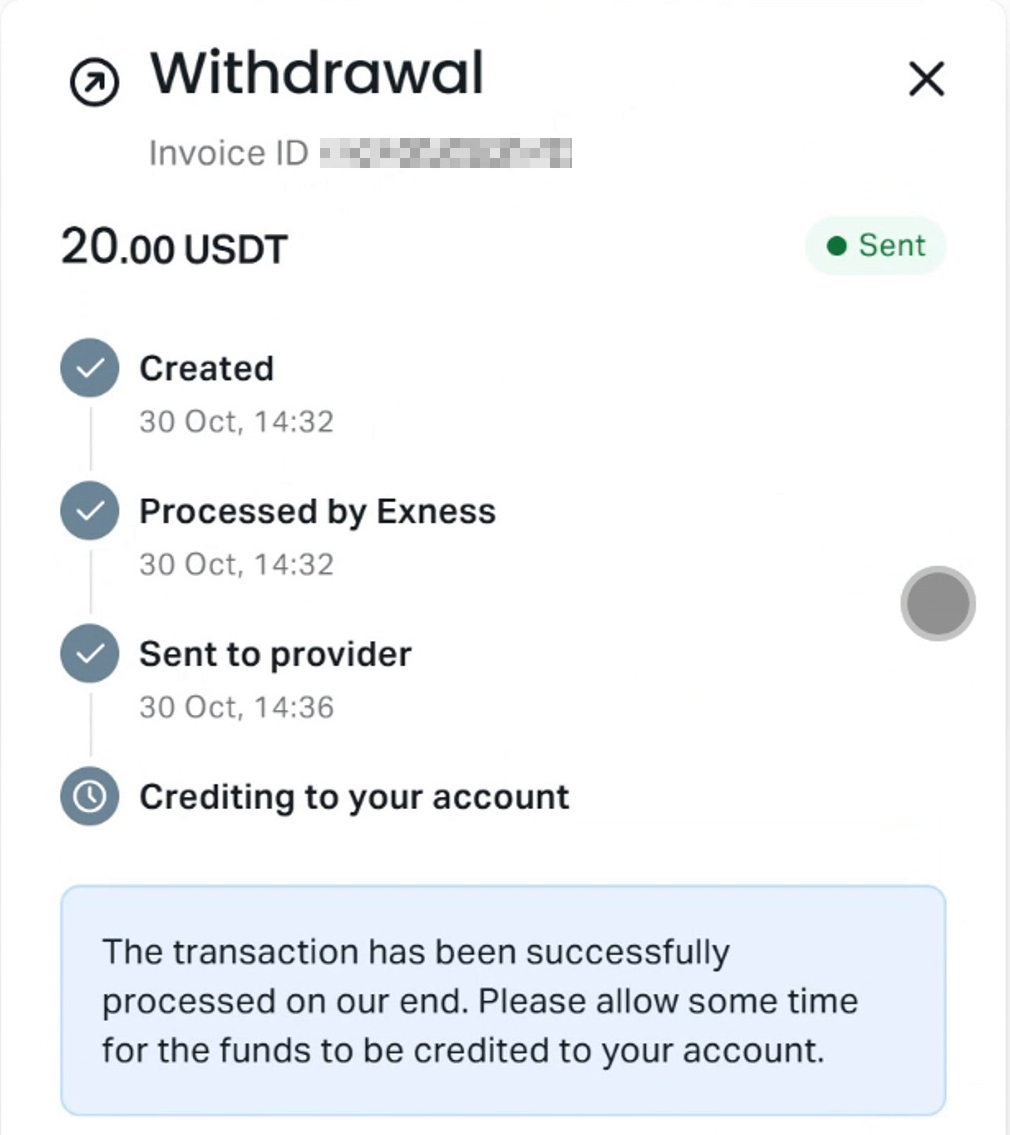
The supplied Figure 1 is dated 30 October 2026. Its source description identifies the withdrawal status as Sent and says the nearby Done labels belong to other transactions. Its contents and account context have not been independently verified. Treat it as a historical illustration; it does not establish a current payment's location or recovery.
Figure 1. Supplied historical screenshot dated 30 October 2026. The source description identifies the withdrawal as Sent; nearby Done labels belong to other transactions. Contents and account context are unverified; this image does not establish destination credit.
The official help-page snapshots supporting this guide were retrieved on 11 November 2026, separately from Figure 1's supplied capture date. Capture dates for Figures 2 through 4, the operator's identity and the original account context are unspecified. Check the current information in your own Personal Area.
1. Open the exact withdrawal and save its details
Log in to your Personal Area, open Transaction history, filter for withdrawals and select the relevant entry. Exness identifies this as the starting point for investigating a missing withdrawal. Select Get support on the transaction when you need assistance. Exness withdrawal troubleshooting instructions.
Save the following:
The invoice ID, withdrawal amount and currency.
The payment method and destination account or wallet identifier.
The displayed status and full transaction timeline.
The request time and any displayed completion or provider-handoff time, including dates and time zones. Mark an unspecified time zone as unknown.
Receiving-account activity from the withdrawal request through your latest check, rather than only a screenshot of the current balance.
Compare the destination shown in the withdrawal with the account or wallet you are checking. If the details appear incorrect, report this promptly to support. Do not assume the payment can be recalled or recovered.
The investigator may request additional or different records. Preserve the originals and send sensitive documents through the official support channel.
2. Check the maximum time for the method you used
Exness says processing times vary by payment method. The Personal Area displays average and maximum expected processing times. If the maximum has passed and the withdrawal is still missing, raise a support request from Transaction history. Passing the average time alone does not establish that the maximum has expired. Exness missing-withdrawal guidance.
Open the information for the method you used. Record its current timing range and units, and read its FAQ. Exness says method information includes predicted processing time, fees and transaction limits, and directs users to confirm current conditions in the Personal Area. Payment method information.
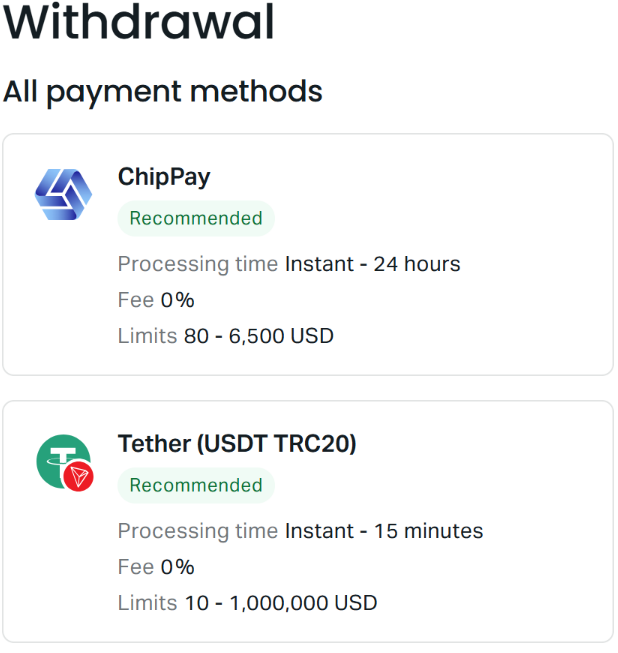
Figure 2. Supplied historical screenshot; capture date is unspecified and account and interface context are unverified. Check your own Personal Area for current method availability and processing times. This example establishes no availability in Thailand or worldwide and guarantees no arrival time.
Figure 2 is a supplied historical method-list illustration. Its capture date is unspecified, and its account and interface context are unverified. Do not use any timing figures visible in it as the current timetable for your withdrawal. The methods displayed in the Personal Area depend on the registered region. Exness withdrawal-method guidance.
If the timing start point, time zone or meaning of business days is unclear, ask support which timestamp and convention apply to your transaction. Keep both the request and completion timestamps. Do not assume a status change restarts the timing window.
3. Ask for a reference the receiving institution can investigate
Use the Exness invoice ID to identify the withdrawal. Ask support which payment route was used and which external payment reference the receiving institution can investigate. Keep the invoice ID, support Ticket ID and external payment reference separately labelled; do not assume they are interchangeable.
Use these questions once support confirms the route. No route's availability or reference is established for your account here.
Confirmed payment route
What to ask support for
Where to take the information
Local bank transfer or wallet payment
An available payout or transfer reference, payment confirmation, and confirmation of which identifier the receiving institution can investigate
Receiving bank or wallet support
Card payment
Confirmation of whether it is a refund and, if so, an available reference the card issuer can investigate
Card issuer's relevant payments or refund team
Transfer confirmed as using Swift
An available transfer confirmation and reference the receiving bank can use to trace that payment
Receiving bank's international-payments team
On-chain crypto withdrawal
The transaction identifier, network, asset and destination address
Receiving wallet or exchange support
Confirm the route before requesting a route-specific reference. A local bank withdrawal is not necessarily a Swift payment, and a card payment is not necessarily a refund.
If no external reference is available, ask what the payment provider can verify now and what information is still needed. A reference can support an investigation, but it does not itself prove that the receiving account was credited.
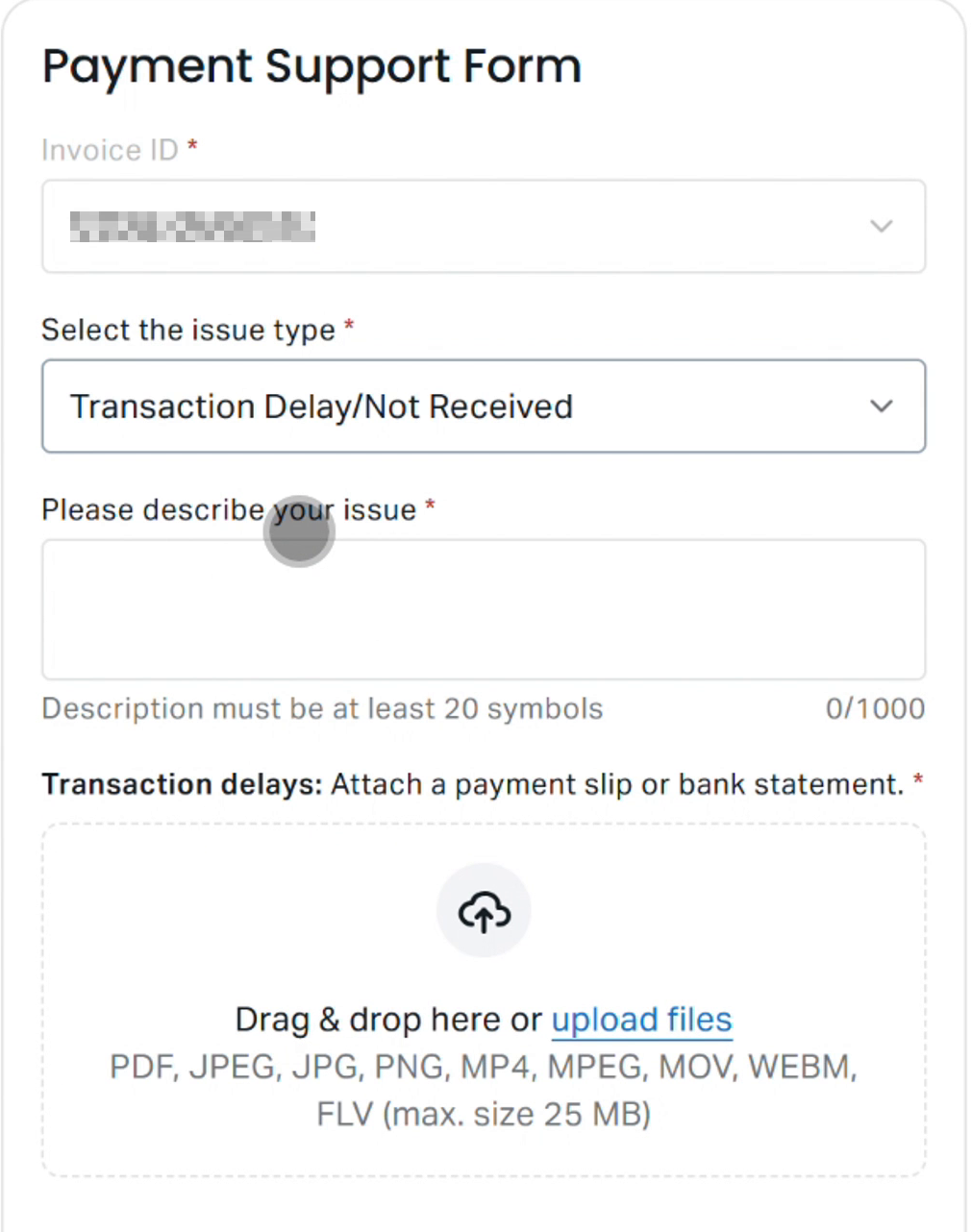
Figure 3. Supplied historical support-form screenshot; capture date, country, contracting entity, account conditions, device and interface version are unspecified. Follow the requirements displayed in your own form; fields and evidence requirements may vary by issue type.
Figure 3 is a supplied form illustration. Its capture date, account context and interface version are unspecified. Follow the requirements displayed in your own form. Exness says ticket fields vary by issue type and may require a trading account number, issue details, and screenshots or recordings. Exness Support hub guide.
Message to adapt
Replace the bracketed fields with your records. Mark missing information as unknown, use the displayed status, and describe attachments only if you are providing them.
Please investigate withdrawal invoice [invoice ID], for [amount and currency], via [payment method], to [destination identifier]. It was requested on [date, time and time zone]. Its current displayed status is [status], checked on [date, time and time zone]. The timeline shows [relevant events and timestamps, or unknown].
The current Personal Area information for this method gives a maximum expected processing time of [value and units], checked on [date, time and time zone]. The timing start point is [confirmed start point, or unknown]. I cannot identify the receiving-account credit as of [latest check date, time and time zone].
I am providing [records supplied], including receiving-account activity covering [start date/time through end date/time]. Please confirm the payment route, destination, any provider-handoff timestamp and latest investigation findings. Please provide an available external reference my receiving bank or wallet can investigate, and clarify any timing details I have marked unknown. What is the next action, and when should I expect the next update?
If the transaction-specific route is unavailable, use Support hub. Exness lists ticket creation, chat and a displayed support telephone number there. Save the Ticket ID so you can add later evidence to the same case. Exness Support hub guide.
5. Follow up and confirm any destination credit
Give the receiving institution the available payment reference and relevant transaction details. If it finds no payment, ask for a written response identifying the reference and search period it checked. Add that response to the existing Exness case and request the provider's findings, the next investigation step and a dated update.
Ask support whether the investigation has identified a return, downstream rejection or destination error. Treat these as questions until the records establish what happened. If support reports a return, ask for its reference, destination and status, then check the relevant account activity.
In Support hub, My tickets lists the Ticket ID, status and creation date. Listed statuses include New and Action Required. Read the ticket message and respond to any requests for information. A status label alone does not establish an update deadline or payment outcome. Exness ticket guidance.
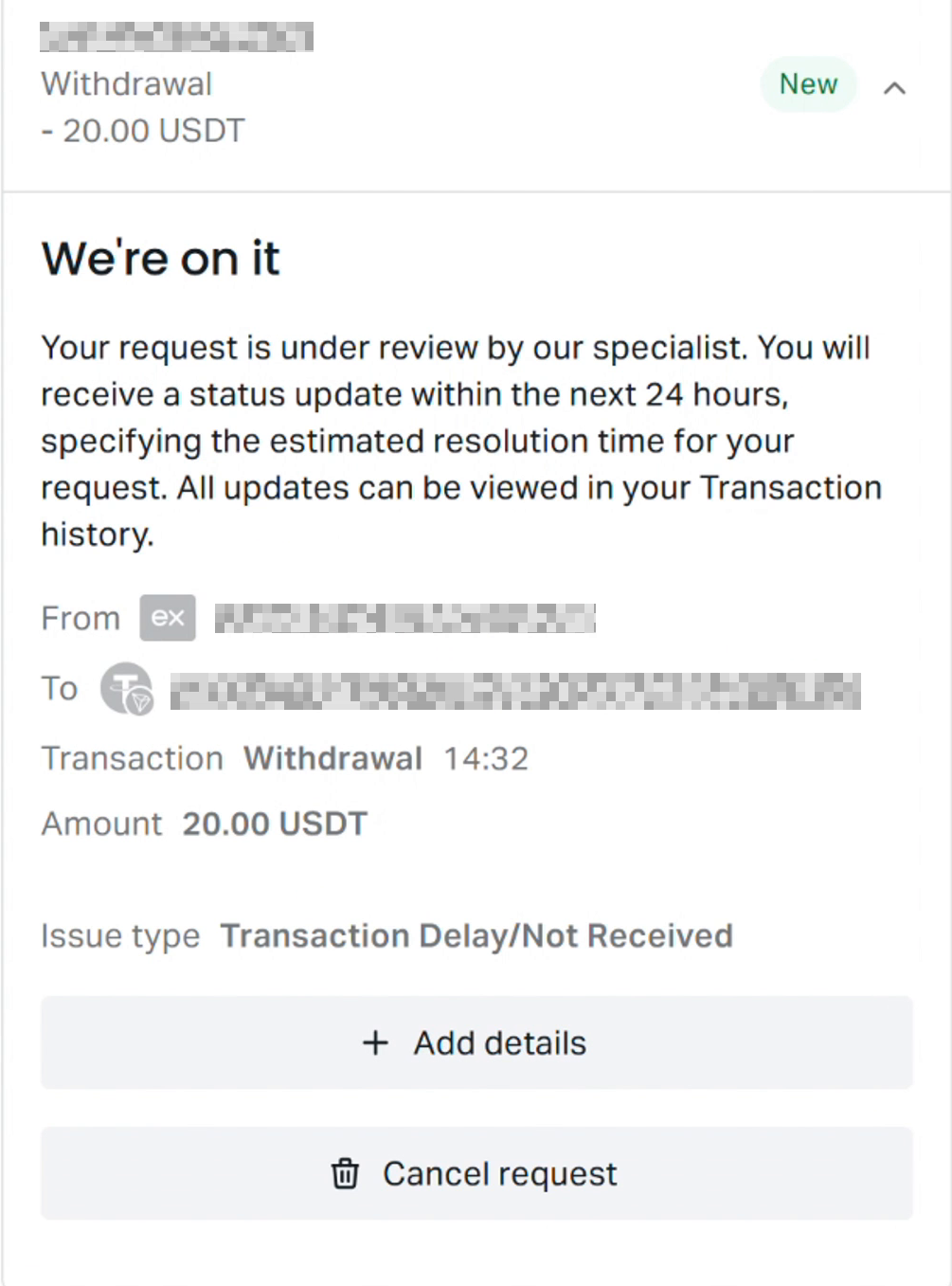
Figure 4. Supplied historical post-submission screenshot; capture date is unspecified and account and interface context are unverified. Follow your own ticket messages and subsequent updates. The New label alone establishes no update deadline or payment outcome; do not rely on this example’s timing text.
Figure 4 is a supplied post-submission illustration. Its capture date is unspecified, and its account and interface context are unverified. Follow the messages and subsequent updates in your own ticket. Do not rely on timing text visible in this historical example.
If an expected update does not arrive, follow up through the existing ticket or official chat with the invoice ID and Ticket ID. Ask what remains outstanding and when to expect the next update. If the case remains unresolved, identify your contracting Exness entity from your account documents and request its applicable formal complaints route and response timetable. No particular entity's complaint procedure or deadline is established here.
Before treating the withdrawal as received, confirm the matching credit in the receiving account and retain that record. The supplied material does not establish the payment's actual location, any eventual credit, a return, a rejection or a destination error. A documented trace request can help the investigation, but it cannot guarantee recovery or a resolution date.
Use support routes reached through your Personal Area. Keep statements and account identifiers out of public posts, and never share passwords or security codes.



 Exness