Filter as you type, press Enter to open the first result6 results
Risk warning:CFDs and leveraged forex trading are high-risk products that can lose your entire capital very quickly, and are not suitable for every investor. Everything on this site is information only and is not investment advice, an offer or a recommendation. Check the rules that apply where you live and read the broker's full terms and risk disclosure before opening an account. Some links on this site are affiliate links that may earn us a commission; this does not affect our scores or rankings.
Exness swap charges and rollover times with MT5 checks
Check when Exness applies overnight swap, which instruments have triple-swap days, how swap-free policies differ and which MT5 fields and historical records explain a debit or credit.
This guide covers Exness policies documented in official snapshots retrieved on 11 November 2026. Applicability depends on registered country, contracting entity, account/server, exact symbol, eligibility at the relevant rollover and dated conditions. The reader's country, entity, account type, account currency and applicable agreement are unknown. Desktop and mobile operating systems and builds, along with screenshot capture dates, are also unknown. Broker availability in any country remains unconfirmed by the local-time examples.
Before you start
For a position-specific check, have the position details, account/server, complete symbol, timestamps and timezone, historical swap inputs, applicable schedule and eligibility records. Missing records limit reconciliation.
What you will learn
Readers can identify the conditions and missing records needed to reconcile a swap entry. Confirming an account-specific amount requires the relevant historical inputs and account records.
An Exness position can incur overnight swap when it crosses the applicable rollover, even if it has been open for less than 24 hours. A negative calculated swap is a debit. A positive result is a credit. The amount depends on the instrument, buy or sell direction, volume, applicable rate, calculation type, currency conversion, day multiplier and swap-free eligibility. Exness's swap explanation
To investigate an entry, identify the rollover the position crossed, check the exact symbol's specification and confirm the eligibility that applied at the time. These checks explain costs. Decisions about opening, holding or closing a position fall outside their scope.
Video reference
When Exness applies overnight swap
Exness publishes weekday swap-posting times of 21:00 UTC in summer and 22:00 UTC in winter. Public or bank holidays can change the schedule. A position can incur swap at rollover after being open for less than a full day. Official swap schedule
Seasonal schedule
UTC posting time
UTC+8 equivalent
UTC+7 equivalent
Summer
21:00
05:00 the next calendar day
04:00 the next calendar day
Winter
22:00
06:00 the next calendar day
05:00 the next calendar day
The fixed-offset conversions are 21 + 8 - 24 = 5 and 22 + 8 - 24 = 6 for UTC+8, and 21 + 7 - 24 = 4 and 22 + 7 - 24 = 5 for UTC+7. Each calculation crosses midnight once, giving a calendar-day offset of 1. The local time falls on the following calendar day.
For example, Wednesday at 22:00 UTC is Thursday at 06:00 in UTC+8 and Thursday at 05:00 in UTC+7. Identify the schedule day in UTC before comparing it with a device's local date. Broker availability in any country remains unconfirmed by these time conversions.
Exness trading servers use UTC+0. Most instruments follow US daylight saving time, while some have UK or Australian DST considerations. The published US summer period runs from the second Sunday in March to the first Sunday in November. For a particular position, select the instrument, relevant date and timezone in the trading-hours tool. It incorporates known holidays, maintenance and DST changes. Instrument trading-hours tool
Swap posting, instrument trading breaks and the broader rollover period have separate schedules. Check the swap-posting schedule separately from any trading break.
Triple-swap days by instrument
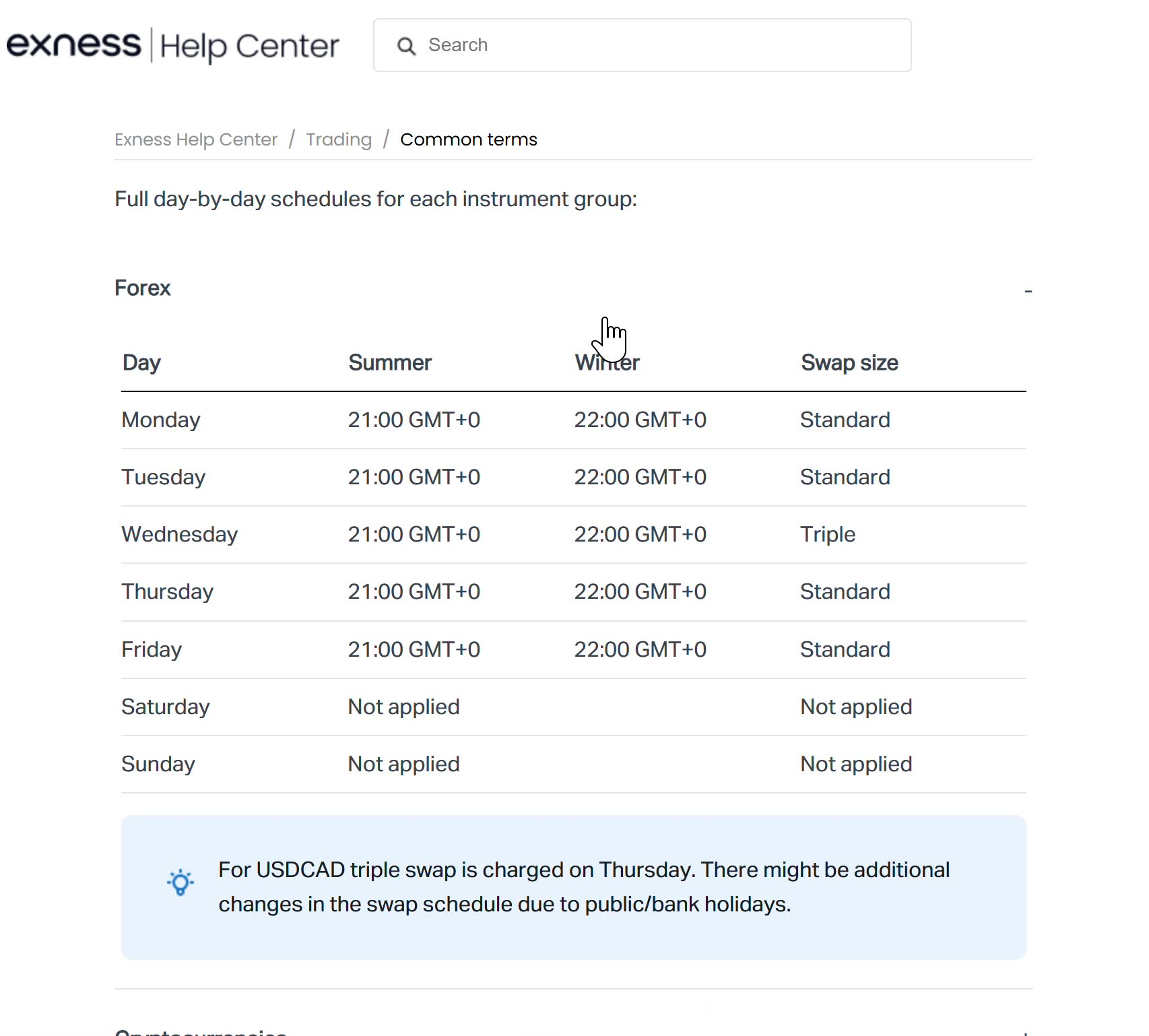
The usual schedule below applies to positions subject to swap. Confirm the full symbol, applicable eligibility and holiday conditions for the date being checked. Posting normally occurs Monday to Friday at 21:00 UTC in summer or 22:00 UTC in winter. Exness instrument-group swap tables
Instrument group
Usual triple-swap day in UTC
Forex other than USDCAD
Wednesday
USDCAD
Thursday
Metals
Wednesday
Cryptocurrency crosses
Wednesday
Other cryptocurrencies
Friday
Indices
Friday
Stocks
Friday
Energies
No regular triple day. Standard weekday swap applies.
The detailed schedule has no separate Saturday or Sunday posting. Exness describes triple swap as accounting for weekend settlement lag, so weekend financing can still contribute to the charge. Public or bank holidays may alter the usual pattern. Swap schedule and weekend treatment
Figure 1. Supplied screenshot described as showing the Exness forex swap schedule and USDCAD exception. The official snapshot supports the schedule and holiday caveat. Capture date is unknown; the image cannot confirm conditions for a particular rollover.
The supplied screenshot is described as showing the forex schedule and USDCAD exception. The official snapshot supports that schedule, subject to the holiday caveat. The screenshot's capture date is unknown, which limits its use when checking a particular rollover.
How the multiplier works
Suppose an unchanged hypothetical daily swap is -2 account-currency units and the event multiplier is 3. The calculation is -2 × 3 = -6, expressed in the same account-currency units for that event. Apply the triple multiplier once in place of the ordinary multiplier. Exness describes the three-times rate, and MetaQuotes documents the weekday multipliers applied to long and short swap. Exness explanation · MT5 specification reference
The -2 figure is hypothetical, and the account currency is unspecified. Multiplying an earlier cash charge by three may fail to reproduce a later entry if the rate, volume, conversion or other applicable conditions changed.
Why swap can appear despite swap-free wording
Exness has separate general and Islamic-country swap-free policies. Both apply status across the Personal Area, but their instrument coverage differs.
General swap-free policy
Under the general policy, status applies across the Personal Area, while exemptions cover only specified instruments. Examples include listed major and minor FX pairs, USDZAR, USDTHB, XAUUSD, XAGUSD, USOIL, UKOIL, all cryptocurrencies and all indices. Stocks and other instruments outside the applicable list can attract swap. Dedicated general policy
Consult the complete list and match the traded symbol, including any suffix, to the account's conditions. Availability in the country associated with a listed currency remains a separate question.
Qualification depends on trading activity. Exness says it notifies clients of changes in the Personal Area and that discontinuing swap-free status makes swap applicable to current and future open orders. The policy wording leaves an individual account's effective change time and any retroactive charges unconfirmed. Qualification and status-change conditions
To check current status, open the Personal Area, then select Exness benefits, Trading conditions and Swap-Free. For an older entry, collect eligibility records and notifications covering the relevant rollover. Today's status alone leaves past eligibility unconfirmed. Official status-check instructions
Separate policy for listed Islamic countries
The Islamic-country policy describes automatic swap-free status for clients registered from its listed countries. It applies across the Personal Area and describes zero or no swap across all instruments on those accounts. Confirm eligibility through the registered country and assigned account conditions. Islamic-country policy
Confirm which policy applies to the account
The official snapshots contain conflicting wording. About swap describes enabled swap-free status as covering all instruments. The dedicated general swap-free policy limits exemptions to specified instruments and identifies a separate policy for Islamic countries. Account coverage therefore needs to be checked against the applicable policy. About swap · Dedicated general swap-free policy
Check the relevant dedicated policy alongside the account's eligibility records and notifications for the rollover in question. Confirming historical treatment requires account-specific records beyond the public policy pages. If those records leave a posted entry unexplained, ask Exness support which policy, instrument coverage and effective conditions applied to that account and rollover.
Check the exact symbol in MT5
Use the account and server associated with the position, and match the complete symbol name. A specification from a different server or a similar symbol may fail to explain the entry.
Desktop MT5
Locate the symbol in Market Watch and open its context menu.
Select Specification.
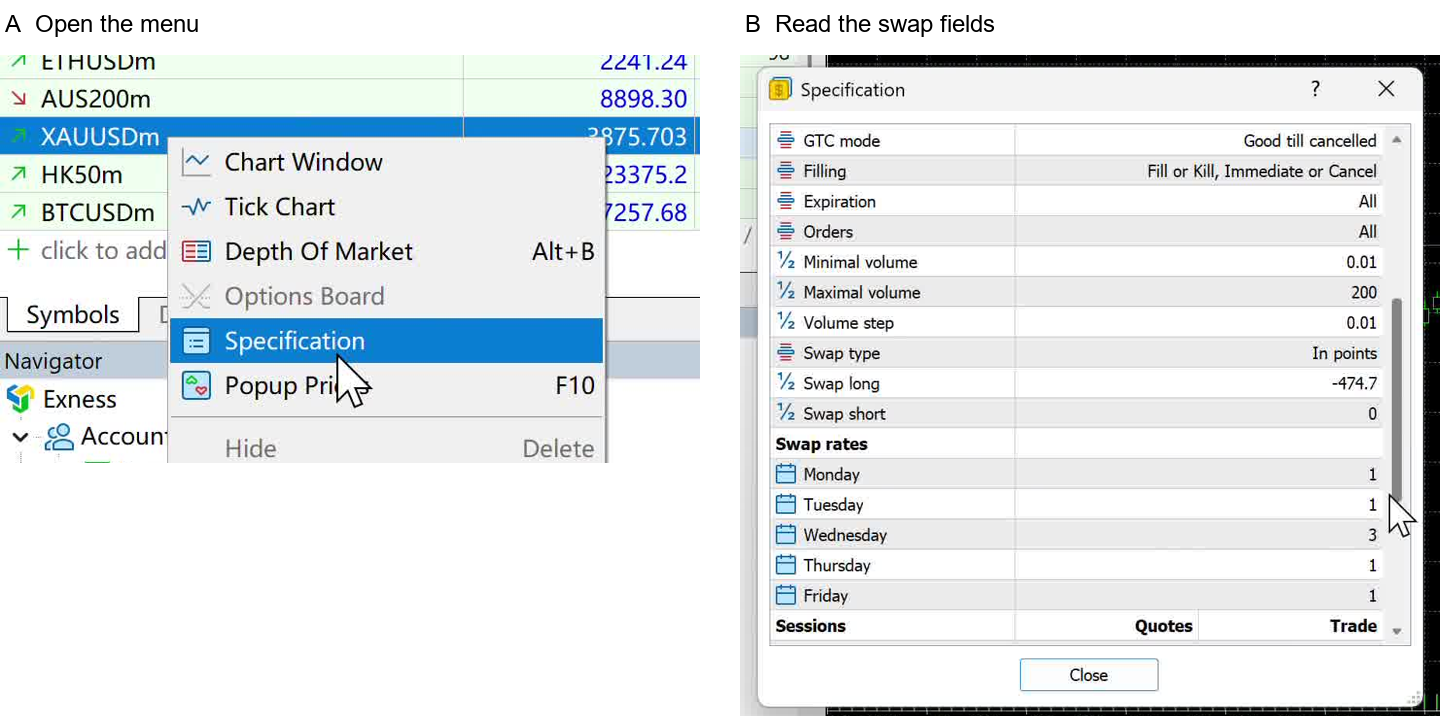
Read Swap type, Swap long for buy positions, Swap short for sell positions and the weekday multipliers together.
MetaQuotes documents this route and the field meanings. The operating system and desktop build used for the supplied illustration are unknown. Desktop MT5 Help
Figure 2. Supplied desktop MT5 screenshots described as showing Specification and swap fields. MetaQuotes documentation supports the desktop route. Displayed values, crops, operating system, build and capture date are unverified; account and server conditions are unknown. The images cannot confirm current rates or a historical charge.
The supplied desktop illustration is described as showing the Specification menu and swap fields. Its displayed values, crops and capture date remain unverified. Use it to locate the fields. Confirming a historical charge requires records for the relevant rollover.
Supplied mobile walkthrough
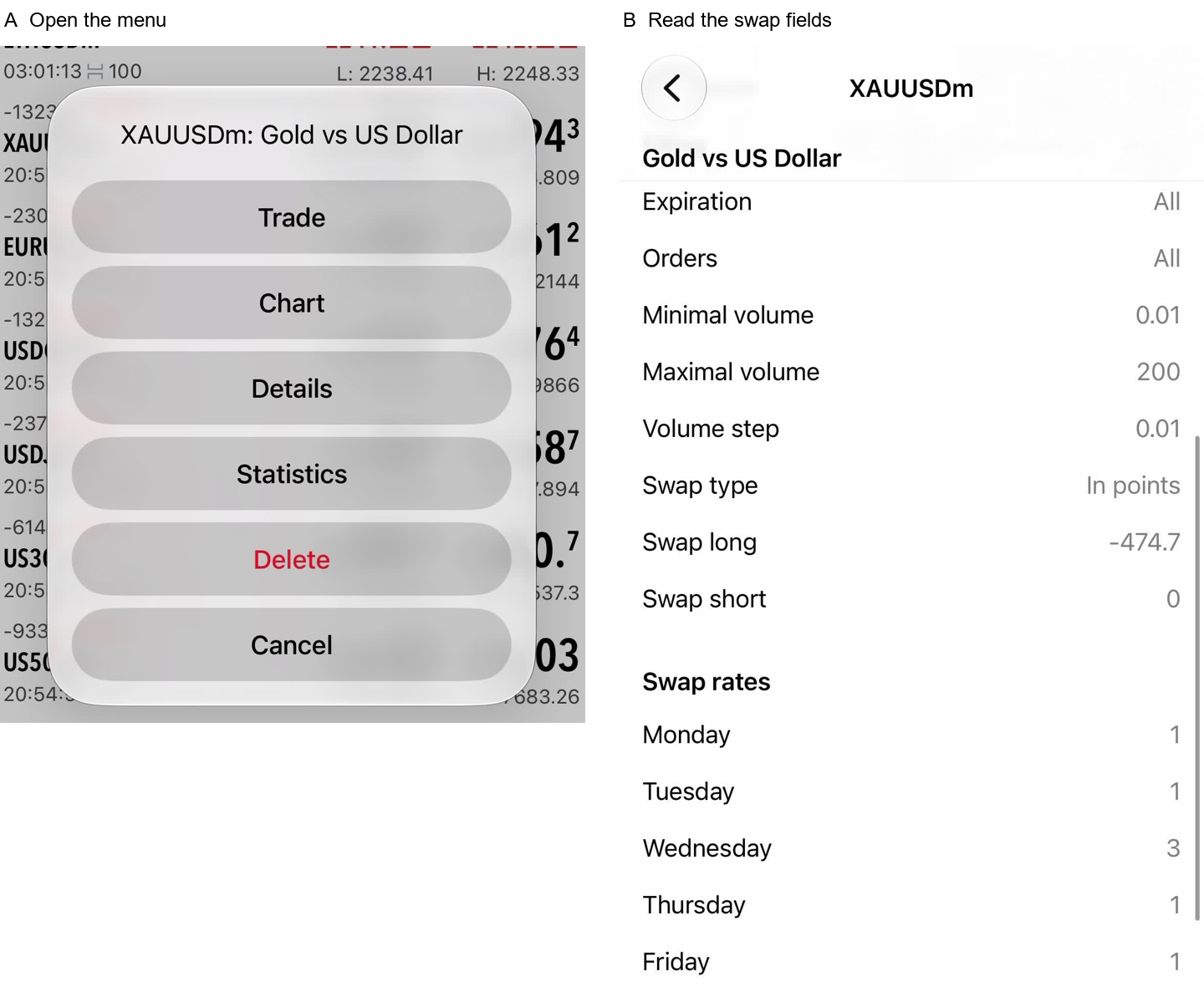
The supplied walkthrough starts in Quotes, opens the symbol menu, selects Details and scrolls to the swap fields. The mobile operating system and build are unknown, and menu labels may differ. This route comes from the illustration's description and remains unverified by the desktop documentation cited above.
Figure 3. Supplied mobile MT5 screenshots described as showing Details and XAUUSDm swap fields. The mobile route, operating system, build, capture date and displayed values are unverified; account and server conditions are unknown. The images cannot confirm current rates or an actual rollover debit or credit.
The supplied mobile illustration is described as showing Details and XAUUSDm swap fields. Its displayed values and capture date remain unverified. Evidence of a charged rollover would require the account's historical records.
Read the units before estimating money
The manuscript describes XAUUSDm with a swap type of points, Swap long -474.7, Swap short 0 and a Wednesday multiplier of 3. These displayed values remain unverified by the official snapshots. The current rate and any actual account charge are also unconfirmed.
A display of -474.7 points needs conversion under the applicable calculation type before it can be read as a cash amount. Treating it as a USD 474.70 debit would be unsupported. Exness explains rates in pips, while MetaTrader uses points and supports other calculation types, including amounts in the base, margin or deposit currency. Exness units and conversion explanation · MetaQuotes swap types
Depending on the calculation type, establish the relevant point or pip size, contract size, position volume, currencies and conversion inputs. Check the symbol's conditions before applying a forex pip convention to gold. MetaQuotes defines contract size as the number of units represented by one lot. Contract specification fields
Long and short rates are separate, so opposite positions can have swap amounts that fail to cancel each other out. A displayed zero short rate leaves permanent swap-free eligibility unconfirmed. Check the rate and eligibility that applied at the relevant rollover. Swap direction fields · Exness eligibility conditions
Reconcile a particular swap entry
Identify the amount recorded as swap and distinguish it from floating profit or loss, spread changes, commissions and other adjustments before comparing numbers.
Collect the records needed for each rollover.
Position or order identifier, account/server, complete symbol, buy or sell direction, volume and account currency.
Opening and closing timestamps with their timezone, plus every relevant rollover while the position remained open.
Historical calculation inputs, including the applicable long or short rate, units, calculation type, relevant point or pip size, contract size, currencies and conversion inputs where required.
The weekday multiplier for each event and any applicable holiday changes.
The applicable swap-free policy, status records and notifications with effective times covering those events.
Compare each rollover separately using its historical inputs. A Specification screenshot taken today can help locate the fields, while an earlier event requires records of the rate and multiplier that applied then. The rate, calculation type and day multiplier are distinct inputs. Exness swap explanation · MT5 specification reference
If the entry still differs, use these records to ask support which rate, units, conversion, multiplier and eligibility were applied. Identify any missing historical inputs. An estimate remains unverified while required inputs are missing.
Exness notes that rollover can involve wider spreads and brief pauses in trading or financial operations. Any attempt to close before a cutoff depends on successful execution and the instrument's actual trading hours. Check the schedule for the relevant date. Instrument schedule and rollover conditions
The supplied illustrations help locate the fields to check. A position-specific debit or credit remains unverified, and confirming an actual entry requires the account's historical records.



 Exness