


 Exness
Under Thai-language Exness videos, one person asked how much a new customer must deposit. Another said their screen still showed $100; a third thought the minimum was 1,700 baht. You may have seen a different number yourself.

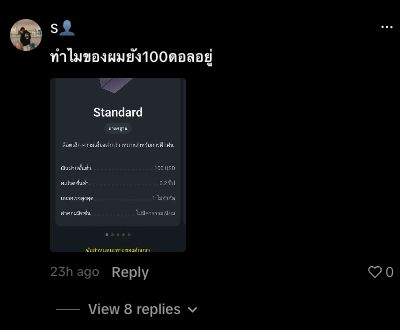

The comments appear under the first video and second video. They are individual questions and recollections, not deposit rules for every account.
Exness says the first deposit depends on the trading account, the payment method and the region where the account was registered. The amount shown in your Personal Area is the one to check before you pay. Exness first-deposit rules
Your account and your payment method have separate limits
Standard and Standard Cent accounts have a low entry requirement, which varies with the payment method and region. Pro, Raw Spread and Zero are Professional accounts. Exness says their first deposit is at least $200, with the exact requirement depending on the region. That $200 figure describes Professional accounts; it isn't a minimum for every Exness customer in Thailand. Exness: minimum amount needed to start trading
The payment method sets another limit. Each available method has its own minimum transaction amount, which applies to later deposits as well. Exness gives a useful example: when an account requires $200 for the first deposit and the chosen method has a $10 minimum, the first deposit still has to reach $200. The example explains how the two limits work together; it doesn't mean you can necessarily deposit $10 into your account.
After the first deposit, Exness says the minimum depends on the payment method you choose. So a different figure on your second deposit does not, by itself, point to a change in policy.
Why might your friend's screen look different?
They may be funding a different type of account or using another payment method. Exness also makes payment options available according to the account's registered region. A screenshot from another country, or even from another account on the same app, may show limits that don't apply to yours.
Currency matters too. $100 and 1,700 baht aren't figures to compare at face value when a payment involves conversion. And if a method doesn't appear in your Personal Area, check whether your account verification is complete before assuming that everyone has lost access to it.
Check your amount before paying
- Sign in to your Exness Personal Area and select the trading account you want to fund. Exness points to Trading → Accounts → Open account for the first-deposit requirement shown by account type.
- Open Deposit and select a method offered to your account. Read its minimum and maximum, currency, fees and processing time.
- For your first deposit, check both the account requirement and the method's limit. Review the final amount and any exchange rate on the transaction summary before confirming.
If your screen shows $100, don't assume it's an outdated rule. Note the account type, method and currency first. If different steps in your Personal Area show conflicting amounts, send Exness support a screenshot with your personal details hidden. Start payments in the Personal Area and use a payment account in your own name; Exness does not accept third-party deposits.
Meeting the deposit minimum also doesn't mean you have enough to open a particular trade. Margin, spread and market conditions still matter. You can practise in a demo account before depositing real money, and check the margin needed for the instrument you plan to trade.
Related video: TOP10BROKERS explains Exness Zero's spreads and trading costs in Thai. The first-deposit amount still needs to be checked in your own Exness account.
Watch TOP10BROKERS on Exness Zero
CFDs carry a high risk of loss, including the loss of all invested capital.